
General Chat Chat about all things Blazer (and related vehicles). Off-topic stuff should be in the lounge, and all mechanical problems should be posted in the proper forum.

overhead display question

Thread Tools
 
Search this Thread
 
Old Dec 7, 2009 | 09:17 PM
  #1  
Buschkj24's Avatar
Thread Starter
|
Starting Member
Joined: May 2009
Posts: 103
Buschkj24 is on a distinguished road
Default overhead display question

i am wondering how to change the display on the overhead console in my blazer. right now it shows the outside temp and what direction you are drive in, but can i get it to show MPG, time, miles before fill-up, ect? my blazer is a 98 ls and i thought they came with these prior to 98 so i would think my blazer would be wired for a different console to display these figures, if not what would need to be done to achieve this?
 
Old Dec 7, 2009 | 09:50 PM
  #2  
SC0RPI0's Avatar
Beginning Member
Joined: Aug 2009
Posts: 30
From: Plant City, Fl
SC0RPI0 is on a distinguished road
Default

I've nvr known a Blazer to read anything other than direction and temp. I used to work for a Chevy dealer so I've seen many a Blazer. If u manage to figure it out and get it to work plz do share. I'd love for mine to read the same. I mean the display looks like it very well could but again, I have yet to see it.
 
Old Dec 7, 2009 | 09:58 PM
  #3  
96Blazernut's Avatar
Junior Member
Joined: Jan 2009
Posts: 475
From: Keene NH
96Blazernut is an unknown quantity at this point
Default

You can read all about how to upgrade your Dirver Information Center here.

https://blazerforum.com/forum/showth...erhead+console
 
Old Dec 7, 2009 | 09:59 PM
  #4  
swartlkk's Avatar
Administrator
Joined: May 2005
Posts: 41,329
From: Waterloo, NY
swartlkk has a reputation beyond reputeswartlkk has a reputation beyond reputeswartlkk has a reputation beyond reputeswartlkk has a reputation beyond reputeswartlkk has a reputation beyond reputeswartlkk has a reputation beyond reputeswartlkk has a reputation beyond reputeswartlkk has a reputation beyond reputeswartlkk has a reputation beyond reputeswartlkk has a reputation beyond reputeswartlkk has a reputation beyond repute
Default

There are two overhead consoles available. Sounds like you have the basic version. I believe there are some threads around here somewhere about what needs to be done to go from the basic to the full feature driver information center.

*EDIT*
Ah see... I watch the fumbled kick off in the football game and get undercut! And then GB goes and throws it away anyhow! LOL
 
Old Dec 7, 2009 | 10:01 PM
  #5  
96Blazernut's Avatar
Junior Member
Joined: Jan 2009
Posts: 475
From: Keene NH
96Blazernut is an unknown quantity at this point
Default

Kyle

Your FAST!!!! I just posted on how to do the upgrade. I wouldn't mind doing it to mine.
 
Old Dec 7, 2009 | 10:05 PM
  #6  
old skool luvr's Avatar
BF Guru
Joined: Sep 2009
Posts: 5,143
From: GTA, Ontario, CANADA
old skool luvr is a glorious beacon of lightold skool luvr is a glorious beacon of lightold skool luvr is a glorious beacon of lightold skool luvr is a glorious beacon of lightold skool luvr is a glorious beacon of lightold skool luvr is a glorious beacon of light
Default

i was just gonna ask Buschkj24 & SCORPIO if they were serious about not knowing how to switch the display. but thanks to Kyle, i've learned there was more than one available, although i've never seen the basic version before.
 
Old Dec 7, 2009 | 10:13 PM
  #7  
96Blazernut's Avatar
Junior Member
Joined: Jan 2009
Posts: 475
From: Keene NH
96Blazernut is an unknown quantity at this point
Default

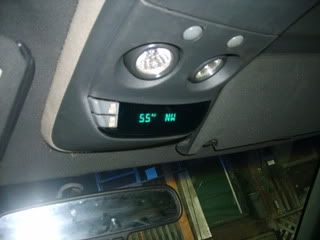
This is what the basic version looks like, this is the one from my Blazer I put in a couple of months ago.

 
Old Dec 7, 2009 | 10:58 PM
  #8  
old skool luvr's Avatar
BF Guru
Joined: Sep 2009
Posts: 5,143
From: GTA, Ontario, CANADA
old skool luvr is a glorious beacon of lightold skool luvr is a glorious beacon of lightold skool luvr is a glorious beacon of lightold skool luvr is a glorious beacon of lightold skool luvr is a glorious beacon of lightold skool luvr is a glorious beacon of light
Default

Originally Posted by 96Blazernut
This is what the basic version looks like, this is the one from my Blazer I put in a couple of months ago.

looks the same as the one in my '98 LT.

mine does this each time i push the "mode" button;

starts off @ - temp.direction *push*
- avg. economy *push*
- inst. economy *push*
- range *push*
- fuel used *push*
- avg. speed *push*
- display is turned off *push*
- back to temp/direction.

 
Old Dec 8, 2009 | 08:19 AM
  #9  
swartlkk's Avatar
Administrator
Joined: May 2005
Posts: 41,329
From: Waterloo, NY
swartlkk has a reputation beyond reputeswartlkk has a reputation beyond reputeswartlkk has a reputation beyond reputeswartlkk has a reputation beyond reputeswartlkk has a reputation beyond reputeswartlkk has a reputation beyond reputeswartlkk has a reputation beyond reputeswartlkk has a reputation beyond reputeswartlkk has a reputation beyond reputeswartlkk has a reputation beyond reputeswartlkk has a reputation beyond repute
Default

The two displays look almost identical. If yours say US/MET on one button and MODE on the other, then you have the Driver Information System which has trip information, etc. If yours says US/MET and ON/OFF, then it is the compass/temp display only.
 
Old Dec 8, 2009 | 09:50 AM
  #10  
Sisk's Avatar
BF Veteran
Joined: May 2009
Posts: 4,772
From: Halifax, NS, Canada
Sisk has a brilliant futureSisk has a brilliant futureSisk has a brilliant futureSisk has a brilliant futureSisk has a brilliant futureSisk has a brilliant futureSisk has a brilliant futureSisk has a brilliant futureSisk has a brilliant futureSisk has a brilliant futureSisk has a brilliant future
Default

Good, so I'm not crazy lol. This explains why mine won't display my fuel economy either. I kept seeing people post about it and couldn't figure it out. I pressed both buttons countless times but couldn't get the MPG to work. Glad to see it was an option that my truck apparently doesn't have.


All times are GMT -5. The time now is 11:33 PM.