2nd Generation S-series (1995-2005) Tech Discuss 2nd generation S-series (1995-2005) general tech topics here.

Need wiring help

Thread Tools
 
Search this Thread
 
Old Jun 27, 2013 | 12:02 PM
  #21  
swartlkk's Avatar
Administrator
Joined: May 2005
Posts: 41,332
From: Waterloo, NY
swartlkk has a reputation beyond reputeswartlkk has a reputation beyond reputeswartlkk has a reputation beyond reputeswartlkk has a reputation beyond reputeswartlkk has a reputation beyond reputeswartlkk has a reputation beyond reputeswartlkk has a reputation beyond reputeswartlkk has a reputation beyond reputeswartlkk has a reputation beyond reputeswartlkk has a reputation beyond reputeswartlkk has a reputation beyond repute
Default

Originally Posted by Gary Burleson
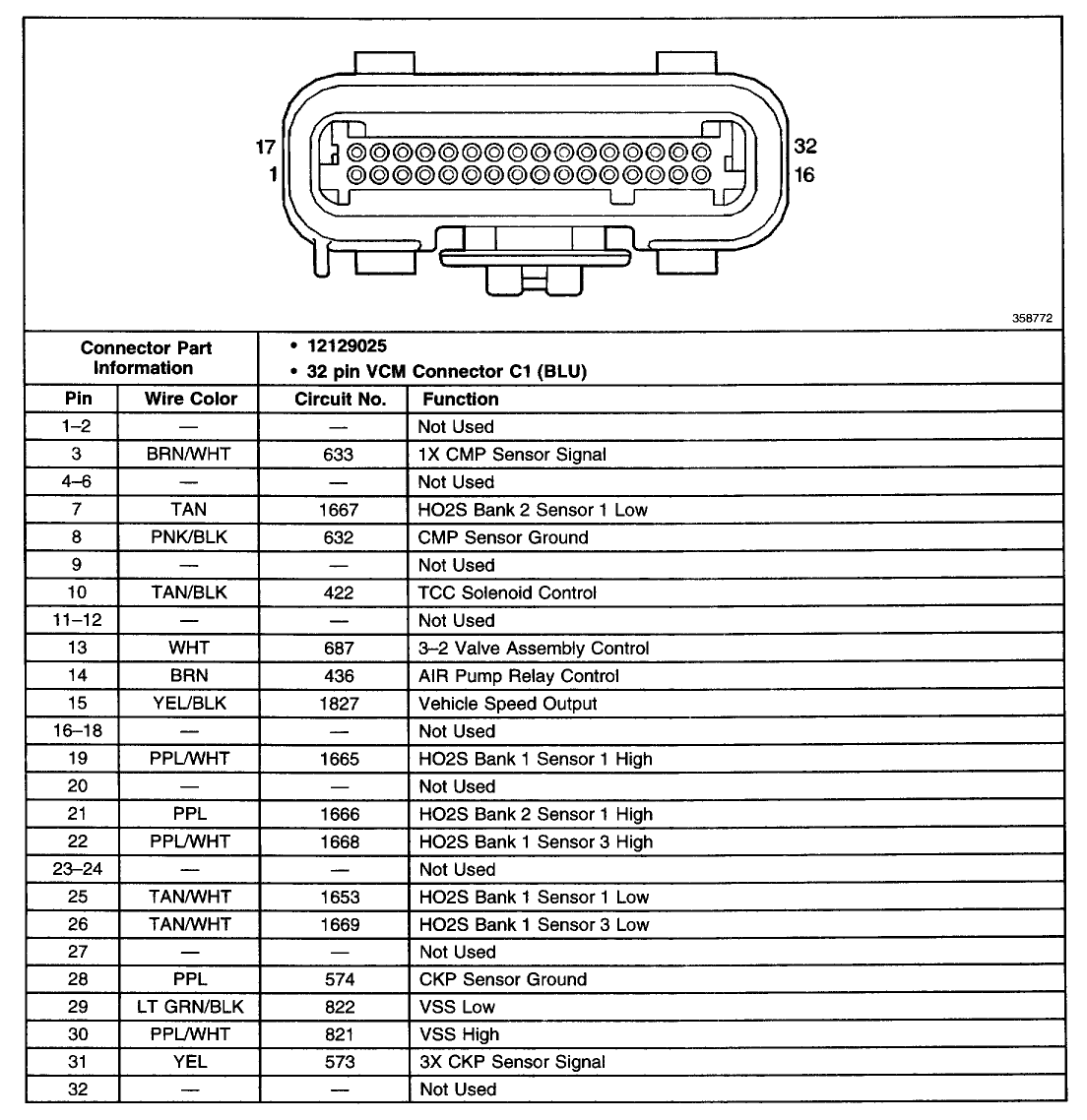
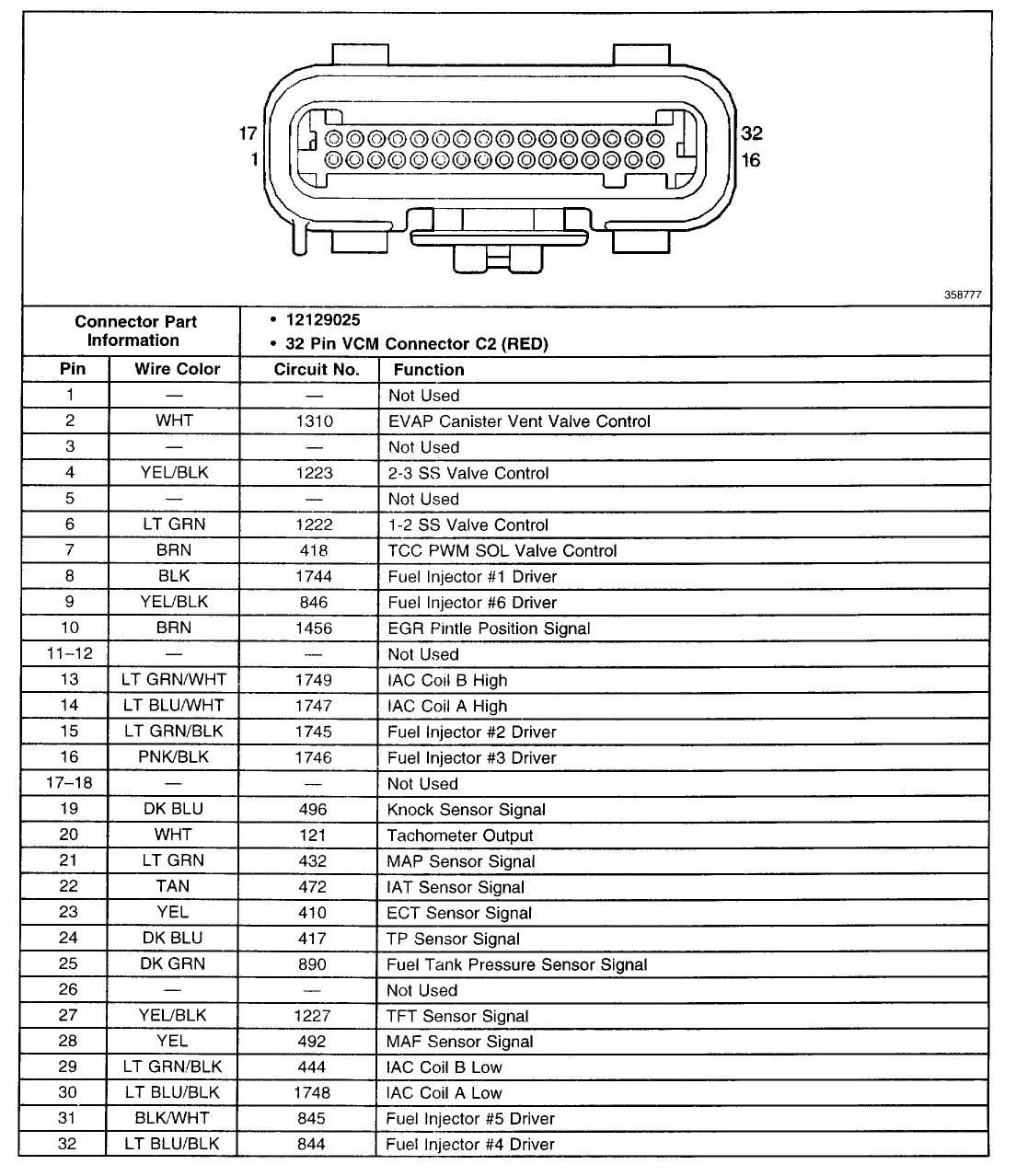
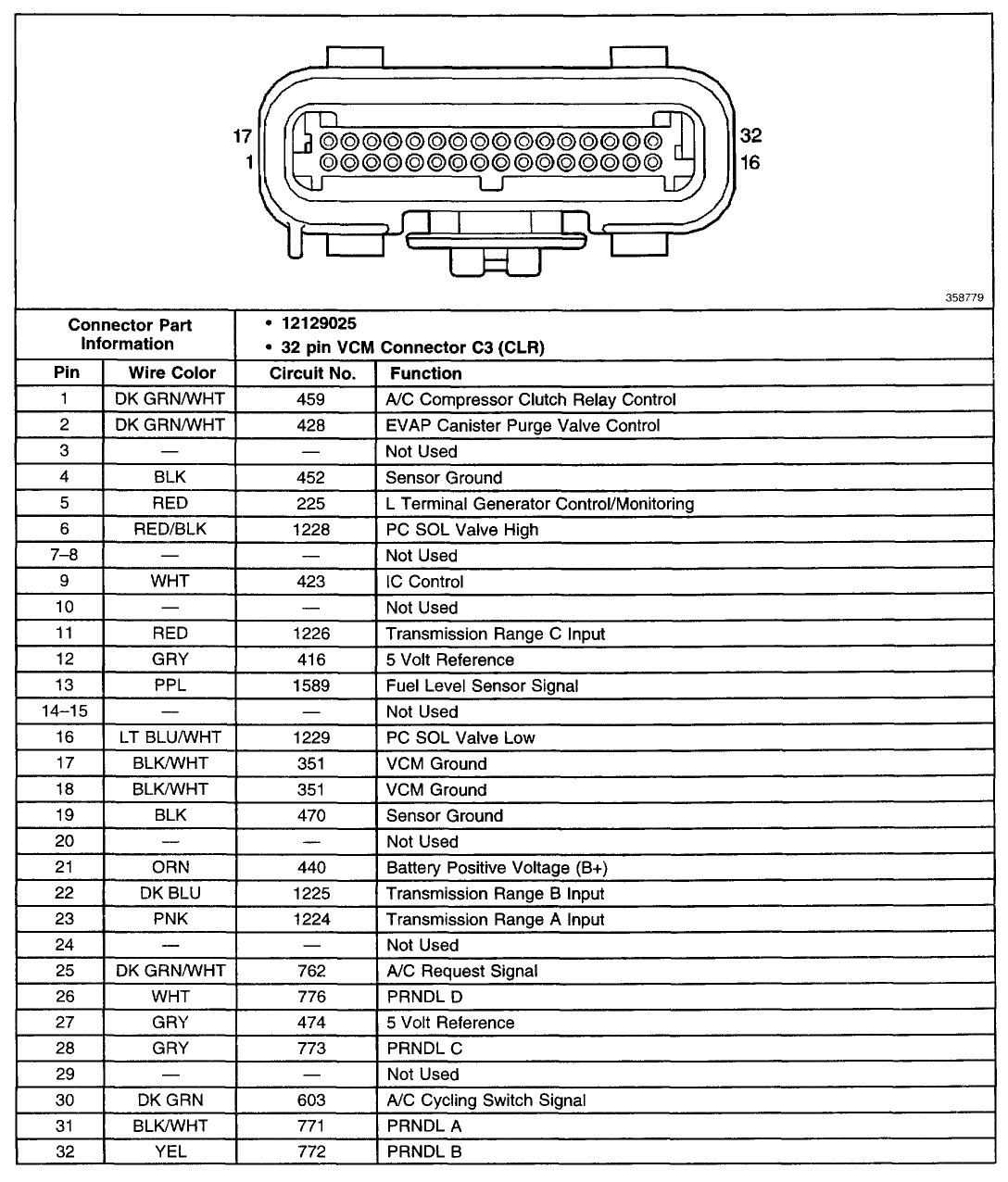
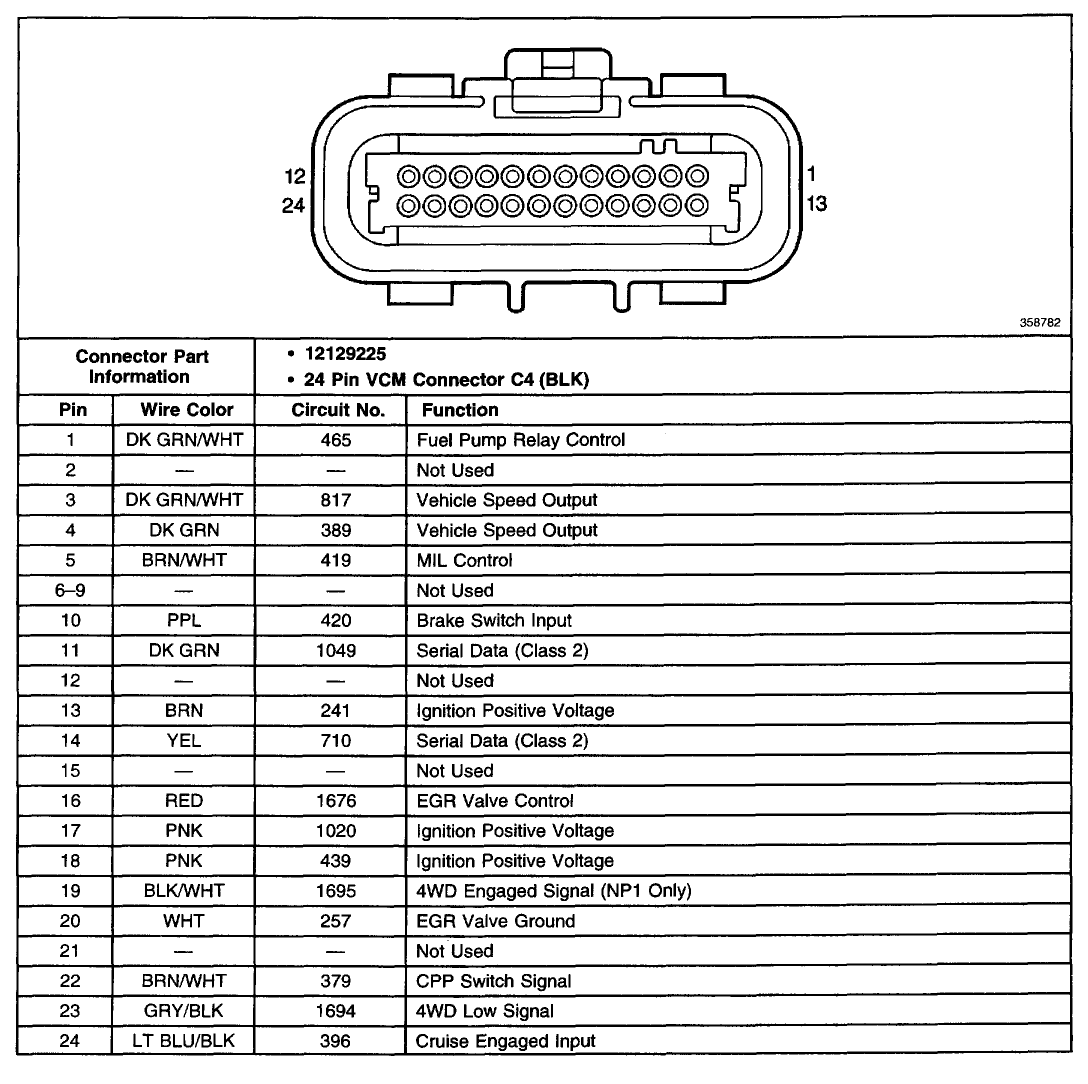
Does anyone have this in a format larger than it's current size ?
Something in the link redirects, which went into affect recently, has broken the links to the full resolution images. To combat this, you will need to click on the images I posted and remove the 'th_' from the beginning of the actual image filename, hitting enter once that is complete to load the full resolution image.

Example, the first link shows the 'th_' prefix to the image filename and the second does not:
http://i11.photobucket.com/albums/a1.../th_PCM_C1.gif
http://i11.photobucket.com/albums/a1...ada/PCM_C1.gif

I have submitted a ticket to get this issue resolved so hopefully the links to the full resolution images will begin working after the ticket has been closed. Thank you for your patience.
 
Old Jun 28, 2013 | 07:09 AM
  #22  
Gary Burleson's Avatar
New Member
Joined: Jun 2013
Posts: 3
Gary Burleson is on a distinguished road
Default

Kyle, thanks for the quick response, worked flawlessly, now all I have to do is figure where these two dk grn/wht go from pin 1 and pin 3 on C1 peace out ! Gary
 

Last edited by Gary Burleson; Jun 28, 2013 at 07:12 AM.
Old Jun 29, 2013 | 10:35 AM
  #23  
Kevin Cody's Avatar
New Member
Joined: Aug 2012
Posts: 7
Kevin Cody is on a distinguished road
Default

O2 sensor question...seems like the best right place.

I am wanting to disable or trick the o2 sensor into making the ECU module think it is active. Which color wires, and what does the ECU expect it to be? A resistor?

any suggestions ould be appreciated. I am not wanting to replace this with a bore out ... btw.

thanks!
 
Old Jun 29, 2013 | 08:53 PM
  #24  
Captain Hook's Avatar
Moderator
Joined: Mar 2009
Posts: 8,453
From: Belleville, Michigan
Captain Hook is a jewel in the roughCaptain Hook is a jewel in the roughCaptain Hook is a jewel in the roughCaptain Hook is a jewel in the rough
Default

Originally Posted by Kevin Cody
I am wanting to disable or trick the o2 sensor into making the ECU module think it is active. Which color wires, and what does the ECU expect it to be? A resistor?

any suggestions ould be appreciated. I am not wanting to replace this with a bore out ... btw.

thanks!
Ain't gonna happen. Oxygen sensors are not monitored continuously for their performance. When the PCM runs the monitor for the sensor(s), fuel mixture is switched from full rich to full lean, then back to normal, (happens in less than a second). The PCM watches how long it takes for the change in fuel mixture to reach the sensor, and how the sensor reacts to it. Pretty tough to design something to "fool" the PCM. When it looks for answers, it wants them immediately, and they better be right, or the check engine light will come on
 
Old Jun 30, 2013 | 01:00 PM
  #25  
Gary Burleson's Avatar
New Member
Joined: Jun 2013
Posts: 3
Gary Burleson is on a distinguished road
Default

OK I have tried the above pin out diagrams they are for a fwd. I thought it would be no big deal but too many differences. Looking at the connection end on the pcm my connection of the four that I am working on is the upper left with black written over that port. The boot color on the wire harness green. Terminals are has follows, 1grn/wht, 2 blank,3grn/wht,4grn,5brn/wht, 6,7,8,9blank,10prple,11grn,12blank
13brn,14wht,15blank,16rd,17org,18blank,20wht,21bla nk,22brn/wht,23blank,24blu/blk...
The grn/wht on pin1 and pin 3 are what I am after, rodent chewed about one foot section off of this harness, unfortunately there are two grn/wht's . With battery disconnected I ohmed out one going to the BTSI and I think the other goes to the switch assm key alarm? . I can't determine which pin 1or3 goes where. 1999 S10 ,2wheel drive, 1GNCS13W7X2156426 .any help would be greatly appreciated. Gary
 

Last edited by Gary Burleson; Jun 30, 2013 at 01:14 PM.
Old Oct 31, 2016 | 05:33 PM
  #26  
Mic_the_Vic's Avatar
New Member
Joined: Oct 2016
Posts: 6
Mic_the_Vic is on a distinguished road
Cool Pinouts

Originally Posted by swartlkk
These should cover it. I've posted them before...


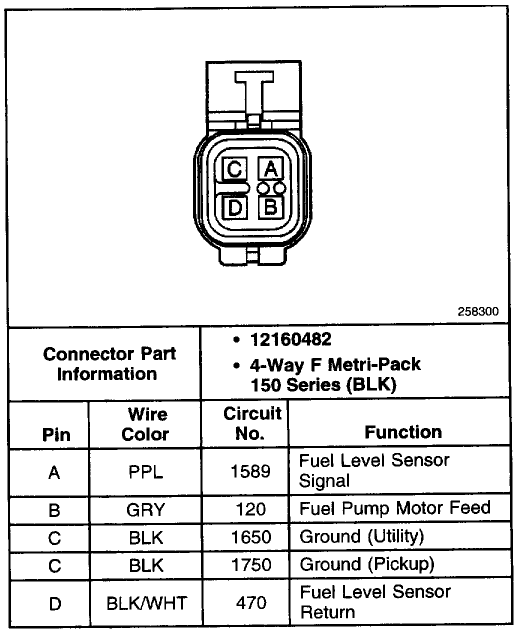
Along with the fuel pump:


You are correct on the fuel pressure sensor connector.

All of the above is applicable to the 2000 model year s-series trucks.
==================
Hey guys...does anybody have these pinouts in printable form...the above images are only thumbnail size?? the fix to remove the th in the link does not work.

much appreciated
 
Attached Thumbnails Need wiring help-th_pcm_c1.gif   Need wiring help-th_pcm_c2.gif   Need wiring help-th_pcm_c3.gif   Need wiring help-th_pcm_c4.gif   Need wiring help-th_fuel_pump_connector.gif  


Last edited by Mic_the_Vic; Oct 31, 2016 at 05:38 PM.
Old Oct 31, 2016 | 05:37 PM
  #27  
swartlkk's Avatar
Administrator
Joined: May 2005
Posts: 41,332
From: Waterloo, NY
swartlkk has a reputation beyond reputeswartlkk has a reputation beyond reputeswartlkk has a reputation beyond reputeswartlkk has a reputation beyond reputeswartlkk has a reputation beyond reputeswartlkk has a reputation beyond reputeswartlkk has a reputation beyond reputeswartlkk has a reputation beyond reputeswartlkk has a reputation beyond reputeswartlkk has a reputation beyond reputeswartlkk has a reputation beyond repute
Default

Originally Posted by Mic_the_Vic
Hey guys...does anybody have these pinouts in printable form...the above images are only thumbnail size??
The issue described in the quote below (from this thread) still stands. You should be able get to the full res images by removing the 'th_' prefix from the image name once the link opens in a new tab/window, but it would appear as though there is currently a problem with Photobucket...

If you still cannot get to the images, feel free to drop the coin on an AllDataDIY account. It really is quite reasonable and will give you much more information (5 years access for your first vehicle runs you $45 and then $30 each vehicle after that).

Originally Posted by swartlkk
Something in the link redirects, which went into affect recently, has broken the links to the full resolution images. To combat this, you will need to click on the images I posted and remove the 'th_' from the beginning of the actual image filename, hitting enter once that is complete to load the full resolution image.

Example, the first link shows the 'th_' prefix to the image filename and the second does not:
http://i11.photobucket.com/albums/a1.../th_PCM_C1.gif
http://i11.photobucket.com/albums/a1...ada/PCM_C1.gif

I have submitted a ticket to get this issue resolved so hopefully the links to the full resolution images will begin working after the ticket has been closed. Thank you for your patience.
 
Old Oct 31, 2016 | 05:43 PM
  #28  
Mic_the_Vic's Avatar
New Member
Joined: Oct 2016
Posts: 6
Mic_the_Vic is on a distinguished road
Default

That would explain it then... cheers for that..

I have searched far and wide and cannot find the pinouts...i really hope these are it
 
Old Oct 31, 2016 | 06:36 PM
  #29  
Mic_the_Vic's Avatar
New Member
Joined: Oct 2016
Posts: 6
Mic_the_Vic is on a distinguished road
Default Images

Thanks guys...I managed to get the images of google archives...

google the following in images:

swartlkk pcm.gif

cheers
 
Old Oct 31, 2016 | 06:40 PM
  #30  
swartlkk's Avatar
Administrator
Joined: May 2005
Posts: 41,332
From: Waterloo, NY
swartlkk has a reputation beyond reputeswartlkk has a reputation beyond reputeswartlkk has a reputation beyond reputeswartlkk has a reputation beyond reputeswartlkk has a reputation beyond reputeswartlkk has a reputation beyond reputeswartlkk has a reputation beyond reputeswartlkk has a reputation beyond reputeswartlkk has a reputation beyond reputeswartlkk has a reputation beyond reputeswartlkk has a reputation beyond repute
Default

Photobucket appears to be acting right again as well so the 'th_' removal trick should work. Just right click on the thumbnail and select 'open in new tab', then remove the 'th_'.


All times are GMT -5. The time now is 01:03 AM.