


How-To: Replacing Throttle Position Sensor(Fault Code P0121)


Thread Starter
|
Junior Member
Joined: Jul 2010
Posts: 286
From: Alabama

 How-To: Replacing Throttle Position Sensor(Fault Code P0121)
Disclaimer: I am not responsible for how you use this how-to. It is meant as a informant to help your process. Also the problem, cause and fix are relevant to my truck as that is what I had experience with. Please fully read this write-up to make sure you have all the tools before you begin this task.
Problem: Transmission had a hard time shifting. Would not shift above 2nd. Acting like it had no transmission fluid yet fluid was topped off.
Cause: Throttle Position Sensor not sending correct signals to the PCM causing the computer not to know when to tell the solenoids to shift properly. Throwing a P0121 code.
Possible Solutions
1. If you have access to a scan tool, see what the idle and WOT (wide open throttle) readings are for the TPS. Check if they're close to the specifications mentioned above. If not, then replace the TPS and re-check.
2. Check for an intermittent open or short in the TPS signal. To do that, you can't use a scan tool. You'll need an oscilliscope. The reason is because scan tools take samplings of many different readings over just one or two data lines and can miss an intermittent drop out. Hook up your oscilliscope and watch the signal. It should sweep up and down smoothly with no drop outs or spikes.
3. If no problems were noticed, perform a wiggle test. Do this by wiggling the connector and harness while watching the pattern. Does it drop out? If so, replace TPS and re-check.
4. If you have no TPS signal, check for 5 Volt reference at the connector. If it's present, check the ground circuit for open or shorts.
5. Make sure the signal circuit isn't 12V. It should never have battery voltage. If it does, trace circuit for short to voltage and repair.
6. Look for any water in the connector and replace TPS as necessary.
Other TPS sensor and circuit related DTCs: P0120, P0122, P0123, P0124
Fix: Replacement of the Throttle Position Sensor.
Steps to replace it:
1) Allow your engine to cool. This makes it easier to work on. Pop your hood and locate your intake piping going to the throttle body.
2) Remove the thumb screw and place it aside. Using a flathead screwdriver loosen the clamp on the throttle body side of your mass air flow(MAF) sensor.
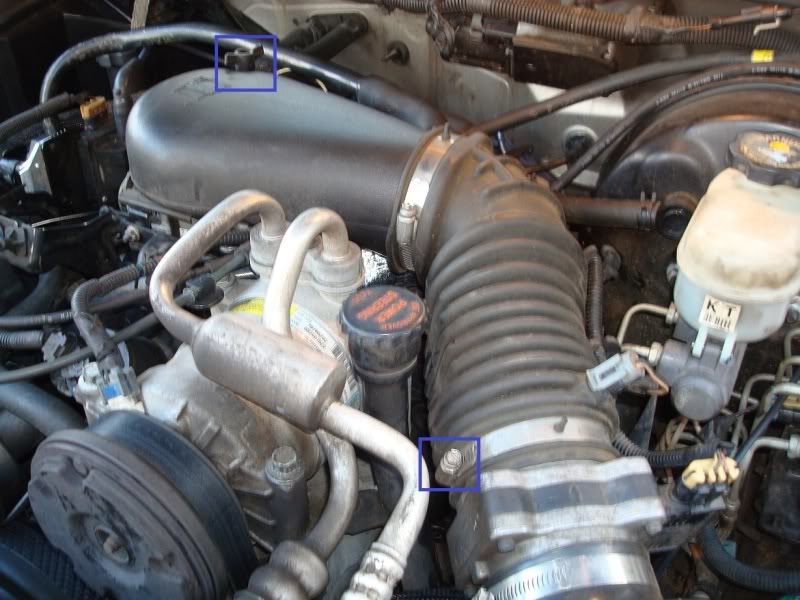
3) Pop the intake pipe off the MAF sensor CAREFULLY then at the throttle body pull up from the bottom clearing the screw and pull the intake pipe towards the front of the vehicle to allow the clips to clear the throttle body.
4) Locate the throttle position sensor and unplug it.

5) Using a T20 driver remove the top bolt and set it aside. You will need to pull the radiator hose towards you to clear it and allow access to the bottom bolt. Refer to picture on which way to pull hose.
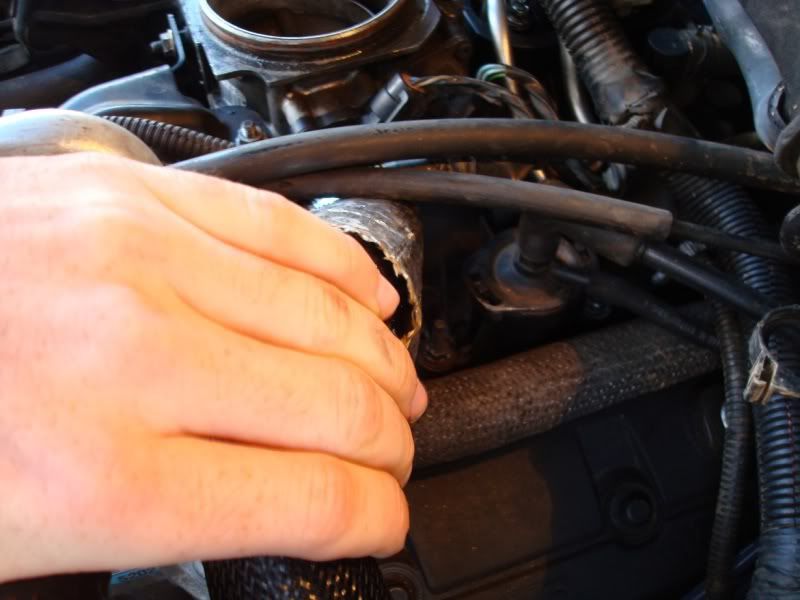
6) Remove old TPS and install new TPS. Careful these only go on ONE way so do not force it. You will need to apply a little force once you get the shaft inserted into the sensor.
7) Re-install everything in reverse order.
8) Turn your key on to Accessories and clear any and all codes. If you have some non-TPS related I advise against clearing out your codes until you fix those problems as well.
9) Crank up and let the engine run for a minute or two and drive it down the road to make sure everything is working correctly.
Thank you for reading this How-To.
Problem: Transmission had a hard time shifting. Would not shift above 2nd. Acting like it had no transmission fluid yet fluid was topped off.
Cause: Throttle Position Sensor not sending correct signals to the PCM causing the computer not to know when to tell the solenoids to shift properly. Throwing a P0121 code.
Possible Solutions
1. If you have access to a scan tool, see what the idle and WOT (wide open throttle) readings are for the TPS. Check if they're close to the specifications mentioned above. If not, then replace the TPS and re-check.
2. Check for an intermittent open or short in the TPS signal. To do that, you can't use a scan tool. You'll need an oscilliscope. The reason is because scan tools take samplings of many different readings over just one or two data lines and can miss an intermittent drop out. Hook up your oscilliscope and watch the signal. It should sweep up and down smoothly with no drop outs or spikes.
3. If no problems were noticed, perform a wiggle test. Do this by wiggling the connector and harness while watching the pattern. Does it drop out? If so, replace TPS and re-check.
4. If you have no TPS signal, check for 5 Volt reference at the connector. If it's present, check the ground circuit for open or shorts.
5. Make sure the signal circuit isn't 12V. It should never have battery voltage. If it does, trace circuit for short to voltage and repair.
6. Look for any water in the connector and replace TPS as necessary.
Other TPS sensor and circuit related DTCs: P0120, P0122, P0123, P0124
Fix: Replacement of the Throttle Position Sensor.
Steps to replace it:
1) Allow your engine to cool. This makes it easier to work on. Pop your hood and locate your intake piping going to the throttle body.
2) Remove the thumb screw and place it aside. Using a flathead screwdriver loosen the clamp on the throttle body side of your mass air flow(MAF) sensor.
3) Pop the intake pipe off the MAF sensor CAREFULLY then at the throttle body pull up from the bottom clearing the screw and pull the intake pipe towards the front of the vehicle to allow the clips to clear the throttle body.
4) Locate the throttle position sensor and unplug it.
5) Using a T20 driver remove the top bolt and set it aside. You will need to pull the radiator hose towards you to clear it and allow access to the bottom bolt. Refer to picture on which way to pull hose.
6) Remove old TPS and install new TPS. Careful these only go on ONE way so do not force it. You will need to apply a little force once you get the shaft inserted into the sensor.
7) Re-install everything in reverse order.
8) Turn your key on to Accessories and clear any and all codes. If you have some non-TPS related I advise against clearing out your codes until you fix those problems as well.
9) Crank up and let the engine run for a minute or two and drive it down the road to make sure everything is working correctly.
Thank you for reading this How-To.
Last edited by Silver00LT; Sep 12, 2011 at 06:35 PM.

great write up.....simple and to the point....pics are great to.
thanks for taking the time to do this.
i have a similar issue going on, no codes though and the tps tested within range.
again, great work!!!
thanks for taking the time to do this.
i have a similar issue going on, no codes though and the tps tested within range.
again, great work!!!

I did this about a year ago, I took a little round about way lol but got the job done.
As of recently I've had problem on the drive home from school (3.5 hours) where I cant shift and accelerate. Engine stops at 3000RPM does this sound like TPS again?
As of recently I've had problem on the drive home from school (3.5 hours) where I cant shift and accelerate. Engine stops at 3000RPM does this sound like TPS again?


Thread
Thread Starter
Forum
Replies
Last Post
russ1609
2nd Generation S-series (1995-2005) Tech
9
Jan 30, 2012 07:08 PM
HoleinOne350
2nd Generation S-series (1995-2005) Tech
2
Apr 6, 2011 10:40 PM
muszyngr
1st Generation S-series (1983-1994) Tech
5
May 28, 2009 02:02 PM
zombiewoof
2nd Generation S-series (1995-2005) Tech
6
Feb 12, 2008 09:13 PM
disturbedgame
Engine & Transmission
15
Feb 12, 2008 05:32 PM