


Adding an updated chime to 1988-94s


Thread Starter
|
Starting Member
Joined: Mar 2012
Posts: 246
From: Austin, Texas

 Adding an updated chime to 1988-94s
Tired of the crappy chime in your truck and want something updated? Maybe yours doesn't even work? This is a solution for you.
Difficulty= 1/10 (10 hardest)
Things you will need (most likely):
Chime module (from a 1994-1997 Olds Cutlass Supreme; 1994-96 Buick Regal/Pontiac Grand Prix)
Phillips screwdriver
7mm socket or nutdriver.
Flat blade screwdriver medium
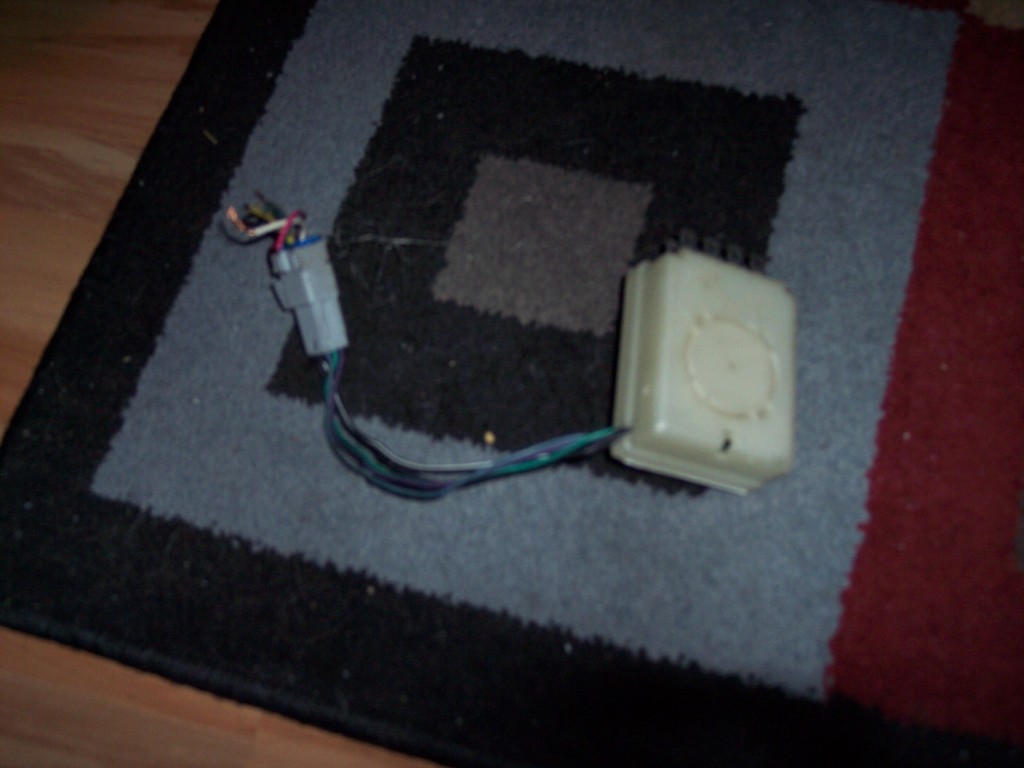
First thing is to get your new module. You will find it in the passenger side up under the dash of the above mentioned GM W bodies. It is white with wires sticking out the end. The wires will be explained below, they will be optional so get a length of wiring after the connector if you want, or just remove the connector. You will need the medium flat blade screwdriver to move the tab that holds the module so you can take it out.
It looks like this:
In an S10, you will need to remove the trim under the dash. There are 6 phillips screws (4 going to the cluster trim and 2 a few inches down on either side. You will also need to remove the e-brake handle, which is a 7mm screw (on my 1991 anyway). Remove the 2 7mm screws holding the lower trim to the trim you're removing. You don't need to remove it completely, just enough to move it out of the way.
The chime is the black box located to the right of the e-brake handle.
Pull your original chime out, again using the flat blade screwdriver.
Plug your new one in.
Reinstall all trim.
Now instead of an annoying DOOOOOOOOOOOOOOOOOOOOOOOOOOOOOOOOOOOOOOOOT, you'll have a nice not-so-annoying "ding, ding, ding, ding"
Now if you want it fully functional:
Difficulty = 4/10 (10 hardest)
On the external connector from the chime module, there are 6 wires:
A: Purple - Turn Signal input (optional) to PURPLE wire on steering column for turn signal switch
B: Dark Green - VSS - to LIGHT BLUE/BLACK wire at DRAC module
C: Light Blue - Door lock signal - to LIGHT BLUE wire at lock relay
D: Pink - not used - Park/Neutral signal
E: Black - Door Unlock signal - to BLACK wire at door lock relay
F: Not used.
Remove the lower dash trim covers on an S10. Both sides. Held in with 7mm screws and one 10mm above the gas pedal.
There are 6 wires to the chime module, you will only be using 4.
Locate the power lock relay, on an S10, it is up and to the right of the gas pedal. On others, it will be the black box with a diagram printed on it.
I just removed the gray tab that keeps the wires in place and slid the end of the bare wire down in the connector and slid the gray tab back in place holding the wire in.
Now run another wire from the chime module DARK GREEN wire to the blue/black wire at the DRAC module located at the ECM. This is the 4000 pulses per mile signal and will lock the doors at 9-10 MPH.
Lastly, run the PURPLE wire to the harness for the turn signal switch at the steering column. There's a purple wire there and tap into it. This will make the chime ding if you leave your turn signal on for more than 2 miles.
Reinstall trim and try out your new features.
Difficulty= 1/10 (10 hardest)
Things you will need (most likely):
Chime module (from a 1994-1997 Olds Cutlass Supreme; 1994-96 Buick Regal/Pontiac Grand Prix)
Phillips screwdriver
7mm socket or nutdriver.
Flat blade screwdriver medium
First thing is to get your new module. You will find it in the passenger side up under the dash of the above mentioned GM W bodies. It is white with wires sticking out the end. The wires will be explained below, they will be optional so get a length of wiring after the connector if you want, or just remove the connector. You will need the medium flat blade screwdriver to move the tab that holds the module so you can take it out.
It looks like this:
In an S10, you will need to remove the trim under the dash. There are 6 phillips screws (4 going to the cluster trim and 2 a few inches down on either side. You will also need to remove the e-brake handle, which is a 7mm screw (on my 1991 anyway). Remove the 2 7mm screws holding the lower trim to the trim you're removing. You don't need to remove it completely, just enough to move it out of the way.
The chime is the black box located to the right of the e-brake handle.
Pull your original chime out, again using the flat blade screwdriver.
Plug your new one in.
Reinstall all trim.
Now instead of an annoying DOOOOOOOOOOOOOOOOOOOOOOOOOOOOOOOOOOOOOOOOT, you'll have a nice not-so-annoying "ding, ding, ding, ding"
Now if you want it fully functional:
Difficulty = 4/10 (10 hardest)
On the external connector from the chime module, there are 6 wires:
A: Purple - Turn Signal input (optional) to PURPLE wire on steering column for turn signal switch
B: Dark Green - VSS - to LIGHT BLUE/BLACK wire at DRAC module
C: Light Blue - Door lock signal - to LIGHT BLUE wire at lock relay
D: Pink - not used - Park/Neutral signal
E: Black - Door Unlock signal - to BLACK wire at door lock relay
F: Not used.
Remove the lower dash trim covers on an S10. Both sides. Held in with 7mm screws and one 10mm above the gas pedal.
There are 6 wires to the chime module, you will only be using 4.
Locate the power lock relay, on an S10, it is up and to the right of the gas pedal. On others, it will be the black box with a diagram printed on it.
I just removed the gray tab that keeps the wires in place and slid the end of the bare wire down in the connector and slid the gray tab back in place holding the wire in.
Now run another wire from the chime module DARK GREEN wire to the blue/black wire at the DRAC module located at the ECM. This is the 4000 pulses per mile signal and will lock the doors at 9-10 MPH.
Lastly, run the PURPLE wire to the harness for the turn signal switch at the steering column. There's a purple wire there and tap into it. This will make the chime ding if you leave your turn signal on for more than 2 miles.
Reinstall trim and try out your new features.
Last edited by RetroBlazer; Jul 25, 2012 at 05:37 PM.


Cool. Every 1st gen blazer ive owned ive ripped out that lil black box. Its backfired twice though. Forgetting to turn off my headlights...woo!
I will pick one up at the pull it yard. the ding ding ding is tolerable.
I will pick one up at the pull it yard. the ding ding ding is tolerable.

Super Member
Joined: Jun 2010
Posts: 1,594
From: Char-town, NC
.
That's awesome! Are those two modules compatible with 2nd gen (95-97) blazers?
Edit: This mod does indeed work on a 2nd gen blazer. Got a '96 Grand Prix door chime module from the yard and just got done installing it in my '96 Blazer. There were a few differences between the module location from the 1st gen blazers to the 2nd gen. The 2nd gen module was located below the radio to the left of the ash tray. But as far as installing this mod, it took maybe an hour to do. I didn't wire any of the stuff from the harness up, but just put the module in. It took so long because I had to remove more bolts than the 1st gen blazer requires. I almost had to take the whole lower dash apart lol.
Edit: This mod does indeed work on a 2nd gen blazer. Got a '96 Grand Prix door chime module from the yard and just got done installing it in my '96 Blazer. There were a few differences between the module location from the 1st gen blazers to the 2nd gen. The 2nd gen module was located below the radio to the left of the ash tray. But as far as installing this mod, it took maybe an hour to do. I didn't wire any of the stuff from the harness up, but just put the module in. It took so long because I had to remove more bolts than the 1st gen blazer requires. I almost had to take the whole lower dash apart lol.
Last edited by tibby; Jul 30, 2012 at 06:09 PM.


BF Guru
Joined: Oct 2010
Posts: 5,962
From: Summit Ny
Lol..... OR take the key out FOO

New Member
Joined: Nov 2015
Posts: 4
This post reminds me of the you tube video of the guy who rewired his Billy Bass so Siri can talk through it.
I have a door chime with a mind of it's own. It comes on intermittently for no apparent reason. 1995 Blazer. Where is it so I can unplug it?
I have a door chime with a mind of it's own. It comes on intermittently for no apparent reason. 1995 Blazer. Where is it so I can unplug it?

Thread
Thread Starter
Forum
Replies
Last Post
etsmith3
2nd Generation S-series (1995-2005) Tech
4
Feb 15, 2010 09:30 AM

