


Help with Wiring Harness for Stereo Install? [96 Blazer]


Thread Starter
|
Starting Member
Joined: May 2013
Posts: 117

 Help with Wiring Harness for Stereo Install? [96 Blazer]
I had an aftermarket pioneer deck that was missing the faceplate, so I am swapping it out for a sony deck I have. I am having a little trouble matching up the wires, and was looking for some advice.
Here is what I show so far to be matched up:
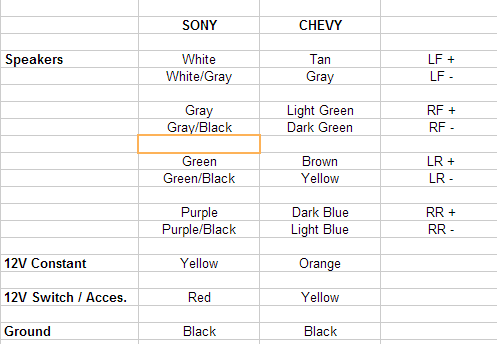
I have every wire on the Sony harness accounted for except for the illumination. There is an adapter already for the antenna which plugs right into the back so that's fine for that.
What am I missing here? Or does that cover everything?
Here is what I show so far to be matched up:
I have every wire on the Sony harness accounted for except for the illumination. There is an adapter already for the antenna which plugs right into the back so that's fine for that.
What am I missing here? Or does that cover everything?


Thread Starter
|
Starting Member
Joined: May 2013
Posts: 117
The sticky at the top shows different than what my wires say, here are the remaining wires I have to figured out.
On my wiring harness it says the following:
Orange = Illumination
Blue = Antenna Power
Red = 12v Switched (12v +)
Yellow = Battery/Constant
This makes more sense, now yellow matches to yellow on my harness, red to red, black to black. The speaker wires are a bit faded so it's hard to tell the color but luckily they're all labeled.
The only wire left is the blue antenna power wire, can I just cap this one off? I have an antenna adapter thing that plugs right into the back of the deck, and I don't have a powered antenna.
On my wiring harness it says the following:
Orange = Illumination
Blue = Antenna Power
Red = 12v Switched (12v +)
Yellow = Battery/Constant
This makes more sense, now yellow matches to yellow on my harness, red to red, black to black. The speaker wires are a bit faded so it's hard to tell the color but luckily they're all labeled.
The only wire left is the blue antenna power wire, can I just cap this one off? I have an antenna adapter thing that plugs right into the back of the deck, and I don't have a powered antenna.
Last edited by phxjosh; May 26, 2013 at 02:11 PM.

Thread
Thread Starter
Forum
Replies
Last Post
phxjosh
2nd Generation S-series (1995-2005) Tech
4
Oct 30, 2013 10:03 AM
