General Chat Chat about all things Blazer (and related vehicles). Off-topic stuff should be in the lounge, and all mechanical problems should be posted in the proper forum.

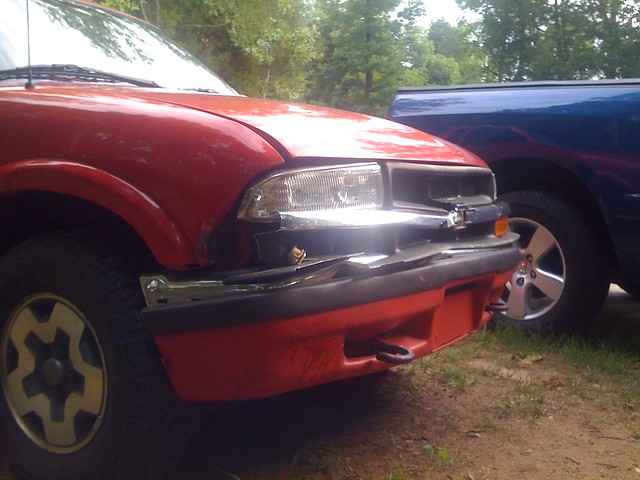
How my truck got the name Deer Dozer

Thread Tools
 
Search this Thread
 
Old Apr 15, 2011 | 11:09 AM
  #11  
chevykid223's Avatar
Beginning Member
Joined: Mar 2011
Posts: 26
From: Brunsswick, Ga
chevykid223 is on a distinguished road
Default

Picture didn't show, and I have never hit a deer with my Blazer. I guess its dumb luck. (shrugs) Oh well.
 
Old Apr 15, 2011 | 01:09 PM
  #12  
Benedict1337's Avatar
BF Veteran
Joined: Aug 2009
Posts: 3,133
From: Harrisburg PA
Benedict1337 will become famous soon enough
Default

lol I've attempted to hit deer before with no luck... chasing them through fields is fun thou
 
Old Apr 15, 2011 | 02:18 PM
  #13  
SlipAngle's Avatar
Beginning Member
Joined: Sep 2009
Posts: 13
SlipAngle is on a distinguished road
Default

I swear this deer appeared out of thin air:

 
Old Apr 16, 2011 | 06:59 PM
  #14  
danb2760's Avatar
Thread Starter
|
New Member
Joined: Oct 2010
Posts: 63
danb2760 is on a distinguished road
Default

umm ok the pic loads on my computer i dont know why you guys cant see it, heres a repost, and how i did it, i email the pic from my phone opened it, coped it the URL and then went here to the forum and clicked insert image and it asked for the URL address of the image and i typed it in and the pic shows up on my computer, any better suggestions? i know you guys want to see this lol
 

Last edited by danb2760; Apr 16, 2011 at 07:04 PM.
Old Apr 17, 2011 | 02:02 AM
  #15  
Zanders's Avatar
Starting Member
Joined: Dec 2010
Posts: 149
From: Wisconsin
Zanders is on a distinguished road
Default

yeah that way it wont work, just download that pic from your email onto your computer and attach it when making the post.
 
Old Apr 17, 2011 | 12:57 PM
  #16  
danb2760's Avatar
Thread Starter
|
New Member
Joined: Oct 2010
Posts: 63
danb2760 is on a distinguished road
Default

so the copy and paste dont seem to work, altough it always shows up on 2 computers in the house, and when i click the insert image thing on the forum it asks for the url and i give it and the picture shows up, but you guys cant see it? what to do now?
 

Last edited by danb2760; Apr 17, 2011 at 12:59 PM.
Old Apr 17, 2011 | 02:05 PM
  #17  
Little Roober's Avatar
Junior Member
Joined: Feb 2011
Posts: 364
From: Southeast Michigan
Little Roober is on a distinguished road
Default

Make it bigger.
 
Old Apr 17, 2011 | 02:41 PM
  #18  
danb2760's Avatar
Thread Starter
|
New Member
Joined: Oct 2010
Posts: 63
danb2760 is on a distinguished road
Default

how do i do that? i tried to click and drag it but it dont let me, its like fixed in one size
 
Old Apr 17, 2011 | 02:42 PM
  #19  
oktain's Avatar
BF Veteran
Joined: Aug 2008
Posts: 3,209
From: Sudbury, ON, Canada
oktain has a brilliant futureoktain has a brilliant futureoktain has a brilliant futureoktain has a brilliant futureoktain has a brilliant futureoktain has a brilliant futureoktain has a brilliant futureoktain has a brilliant futureoktain has a brilliant futureoktain has a brilliant futureoktain has a brilliant future
Default

Click the link in my signature that says "How to post your images!"
 
Old Apr 17, 2011 | 02:47 PM
  #20  
danb2760's Avatar
Thread Starter
|
New Member
Joined: Oct 2010
Posts: 63
danb2760 is on a distinguished road
Default

did this work?lol i hope so


All times are GMT -5. The time now is 03:02 PM.