


How to post vehicle info under name


Thread Starter
|
Starting Member
Joined: Jan 2009
Posts: 108
From: Connecticut

 How to post vehicle info under name
I noticed when people post that it has their vehicle info under their name. I'm not talking about in the signature section under every post, but under their name when they make a post. This is the section where it has my name "pmezo", my member status "new member" and then there should be my vehicle status. How exactly do i post that?

Starting Member
Joined: Dec 2009
Posts: 197
From: Council Bluffs Iowa

Its called a sig bout to try to apply here is the link
https://blazerforum.com/forum/showth...t=32227&page=3
https://blazerforum.com/forum/showth...t=32227&page=3

BF Veteran
Joined: May 2009
Posts: 4,772
From: Halifax, NS, Canada

I think he was referring to the Garage section of the forum, not a sig (as he mentioned in his post...). You can have a virtual "Garage" on the forum where you store all your vehicle info. The info appears under your username here:
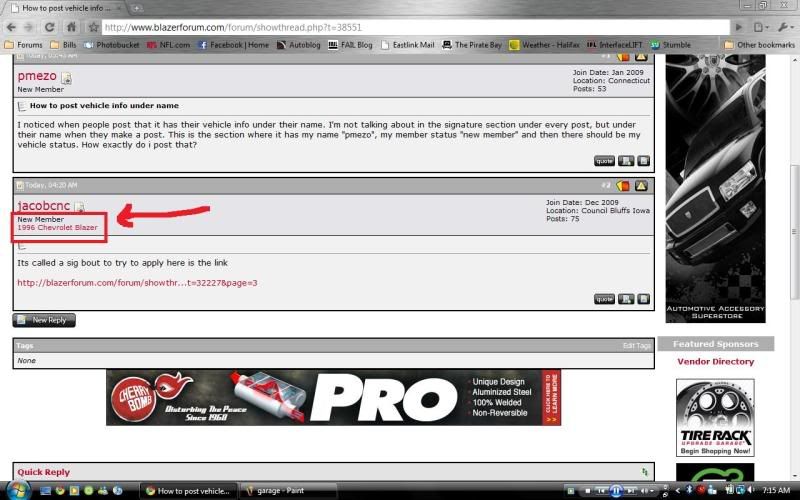
You can enter into your Garage by clicking the Garage link on the top menu bar:
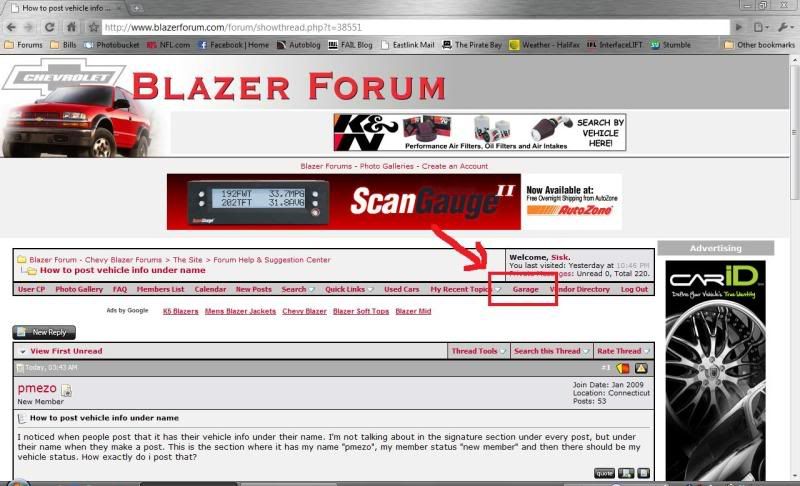
Then click on "Add New Vehicle" to input all your info. After you do that you will have a link to your garage appear under your username. You can add multiple cars to your garage.
You can enter into your Garage by clicking the Garage link on the top menu bar:
Then click on "Add New Vehicle" to input all your info. After you do that you will have a link to your garage appear under your username. You can add multiple cars to your garage.


Thread
Thread Starter
Forum
Replies
Last Post
apo02
General Chat
0
Dec 13, 2012 03:58 AM
TreasonAgainstCaesar
Website Problems and Suggestions
10
Aug 10, 2010 01:28 AM
