


PC Q; BIOS Question...


Thread Starter
|
Starting Member
Joined: Mar 2010
Posts: 113

 PC Q; BIOS Question...
I got a dual boot machine - Windows and Linux - not really related to the problem tho'...
Neither OS will boot if I leave the wireless antenna for the mouse in it's USB Port - it will lock up after GRUB menu.
Pull the mouse antenna before I boot up, and all is fine.
So, I think a BIOS Setting is pulling up the USB Mouse antenna as a drive???
Anyone know what setting might change this action?
Neither OS will boot if I leave the wireless antenna for the mouse in it's USB Port - it will lock up after GRUB menu.
Pull the mouse antenna before I boot up, and all is fine.
So, I think a BIOS Setting is pulling up the USB Mouse antenna as a drive???
Anyone know what setting might change this action?

That is an odd one. One thing I would check in the bios is the boot priority, set the USB to the last thing for anything to try to boot from,
do the hard drive, cd rom ect and have USB as the last option so it can load the OS first and once that is loaded then the mouse dongle?
That is all that I can think would be the issue.
do the hard drive, cd rom ect and have USB as the last option so it can load the OS first and once that is loaded then the mouse dongle?
That is all that I can think would be the issue.
Thread Starter
|
Starting Member
Joined: Mar 2010
Posts: 113
Thanks Rich - I failed to mention; the USB inTO which the mouse dongle is plugged (when it causes the problem), is a multi-USB hub added to the front panel, and which is connected to the mobo by a single connector:
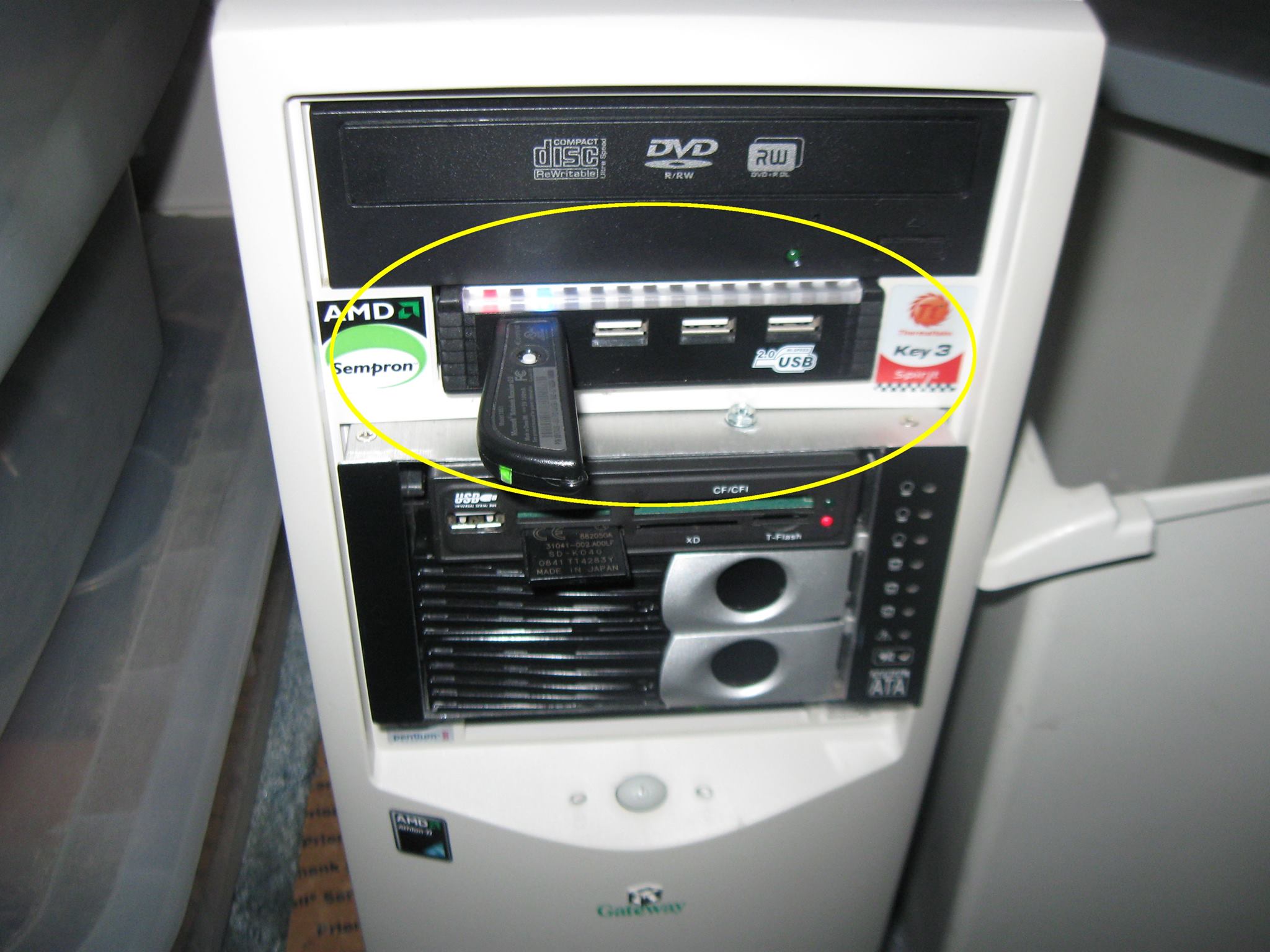
As far as Boot Device Priority, I have 2 different hard drives as device 1, and 2; the third device is disabled, for booting (although SOME USB channel - not sure which one - either one of the 4 in the ONE device, or the single USB in the Multi-Port Device that's BELOW it).
I see no BIOS setting for 'emulation' of a USB channel, as a hard drive???
As far as Boot Device Priority, I have 2 different hard drives as device 1, and 2; the third device is disabled, for booting (although SOME USB channel - not sure which one - either one of the 4 in the ONE device, or the single USB in the Multi-Port Device that's BELOW it).
I see no BIOS setting for 'emulation' of a USB channel, as a hard drive???


Have you tried disabling 'Legacy USB' support in the BIOS?
Does it act the same way with it plugged into the back of the machine directly into the motherboard USB ports? If so, you can get a USB extension cable to bring the dongle closer to the mouse.
Does it act the same way with it plugged into the back of the machine directly into the motherboard USB ports? If so, you can get a USB extension cable to bring the dongle closer to the mouse.
Thread Starter
|
Starting Member
Joined: Mar 2010
Posts: 113
Haven't actually tried that yet Kyle; like to know what it is first, before blindly trying it (kind of like Plug N Pray diags on the Jimmy - replace parts hoping to find the problem).
I HAVE found that setting in BIOS. And on same page, the USB Device - 1 Hub, 4 'Drives'...
Will Legacy Disable make them be seen NOT as drives? (blowing up the OS GrubLoader is worse than an electrical short in the Jimmy, THAT'S a scary screw-up)
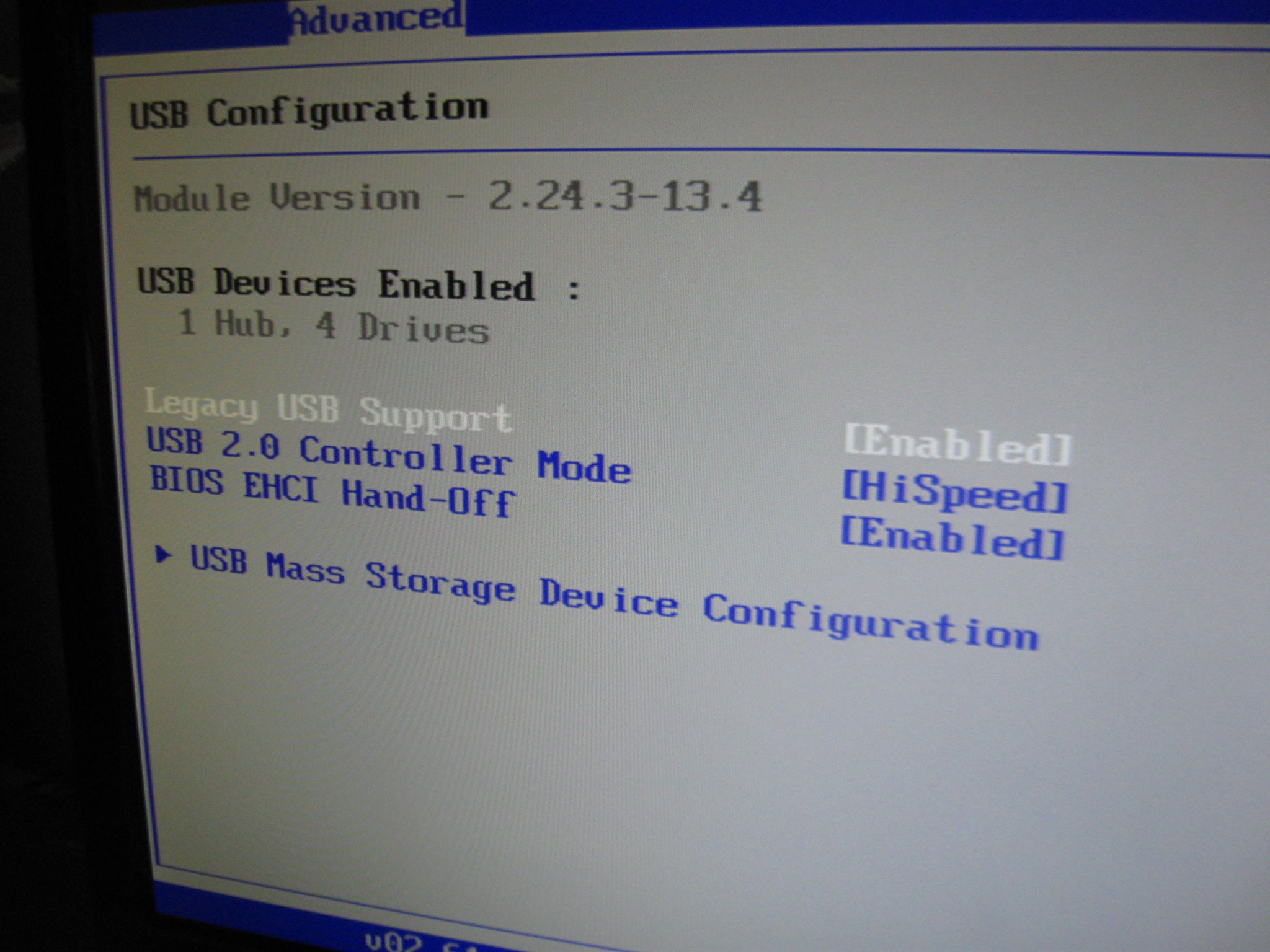
I HAVE found that setting in BIOS. And on same page, the USB Device - 1 Hub, 4 'Drives'...
Will Legacy Disable make them be seen NOT as drives? (blowing up the OS GrubLoader is worse than an electrical short in the Jimmy, THAT'S a scary screw-up)

Thread
Thread Starter
Forum
Replies
Last Post
2001Blue
Lifting Tech
5
Jan 1, 2011 07:15 PM
98Ltblazer
2nd Generation S-series (1995-2005) Tech
0
Apr 11, 2010 11:34 PM
Numba1Sean
2nd Generation S-series (1995-2005) Tech
6
May 6, 2009 11:48 PM
redfan13
Audio/Video Electronics
6
Mar 11, 2008 09:37 PM
Chadoo951
2nd Generation S-series (1995-2005) Tech
6
May 6, 2007 07:01 PM